
Screenshots
Giới thiệu về স্বরচক্র বাংলা (Swarachakra Bangla)
স্বরচক্র বাংলা (Swarachakra Bangla) is an Android keyboard app built to make typing Bengali faster and more intuitive. Designed by the Swarachakra Team at IIT Bombay, it organizes the Bengali script using a phonetic layout that matches how consonants and vowels are taught in traditional textbooks—so if you learned Bengali in school, the keyboard will feel immediately familiar.
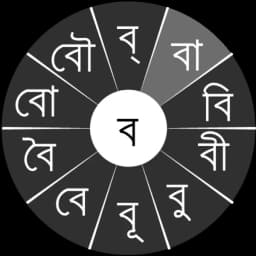
The core innovation is the chakra input method. When you tap a consonant, a circular menu appears showing all the consonant combinations, matras (vowel marks), and conjuncts you can form from that letter. Instead of hunting through multiple screens, you simply slide to select the combination you need. This sliding mechanism makes typing complex Bengali characters and word formations much faster than hunting through layers of menus. Vowels and additional characters have their own dedicated chakras, so you can access them without breaking your typing rhythm.
Bengali text has many nuances—from rare vowels to special characters like the brafar, rashtrachinha, and nukta. This keyboard includes comprehensive support for all of them, with quick-access keys at the bottom for characters you might use less frequently. You also get numerals, symbols, and a temporary QWERTY layout for quick English text, so you never have to switch keyboards entirely.
Setting it up is straightforward. After installing the app, go to your device's Language and Input settings, enable স্বরচক্র বাংলা (Swarachakra Bangla) as your keyboard, and you're ready to type. The app requires Android 4.0 (ICS) or later to support the Unicode character set that Bengali needs, but compatibility extends across most modern Android devices.
Whether you're writing professional emails, composing social media posts, or messaging in Bengali, this keyboard reduces the friction of typing in a script-based language. The phonetically logical layout combined with the chakra system means fewer taps, faster text entry, and fewer mistakes—especially when dealing with conjuncts and matras that frustrate users of less thoughtful keyboard designs.
Ưu điểm & Nhược điểm
Ưu điểm
- Phonetic layout matches traditional Bengali textbook organization for intuitive learning
- Chakra circular menu system reduces taps needed for conjuncts and matras
- Comprehensive support for rare vowels, brafar, rashtrachinha, and nukta characters
- Built-in QWERTY toggle lets you type English without switching keyboards
Nhược điểm
- Requires learning a new keyboard layout even if familiar with QWERTY typing
- Circular menu interactions may feel slower than traditional keyboard rows initially
- Limited to Android 4.0 and later devices, excluding some older phones
- No mention of cloud sync or predictive text for faster composition
Ứng dụng liên quan

Fonts Art - Keyboard Fonts
AIBY Inc.
Keyboard fonts app with 400+ themes, stylish text, kaomoji, and home screen customization.

Fonts Aa - Keyboard Fonts Art
ZipoApps
Keyboard fonts with 40+ styles, emojis, and symbols. Stand out on social media with styled text art.

Sogou Input
Sogou.com Inc.
Chinese keyboard with text prediction, handwriting input, emoji, and stickers for Android typing.

Gun Keyboard
Toad
Keyboard with 500+ emojis, predictive text, and free themes for Android—Gun Keyboard, customizable and fast.

iGame Keyboard
Infinity+
Gaming cheat codes made easy—activate cheats in-game with one tap using iGame Keyboard.

Chrooma Keyboard
Game Lounge
Customizable keyboard app with adaptive colors, word prediction, and one-handed mode for Android.
Latest Articles

Best DealSeek alternatives in 2026 (we compared 7)
Jun 10, 2026

Best Discovery Plus alternatives in 2026 (we compared 7)
Jun 10, 2026
Discovery Plus vs iHeartRadio in 2026: video shows vs free radio, head to head
Jun 10, 2026

iHeartRadio vs SoundCloud in 2026: free radio app vs music discovery, compared
Jun 10, 2026

Is HappyMod legal in 2026? Copyright, country snapshots, and verified alternatives
Jun 10, 2026